Admin & Edit Mode Guide

Every hidden control,
every secret trigger.

A complete walkthrough of every long-press, hidden panel, and secret feature built into the Sporty Clone app — explained simply, with full details on demand.

9
Sections
30+
Hidden Triggers
13
Exclusive Features
🎯 Betslip 📂 Open Bets 📜 Bet History 🎫 Ticket Details 👤 Profile 💸 Withdraw 🎮 Show Off 🏠 Dashboard Admin
🎯
Betslip
betslip.php
1
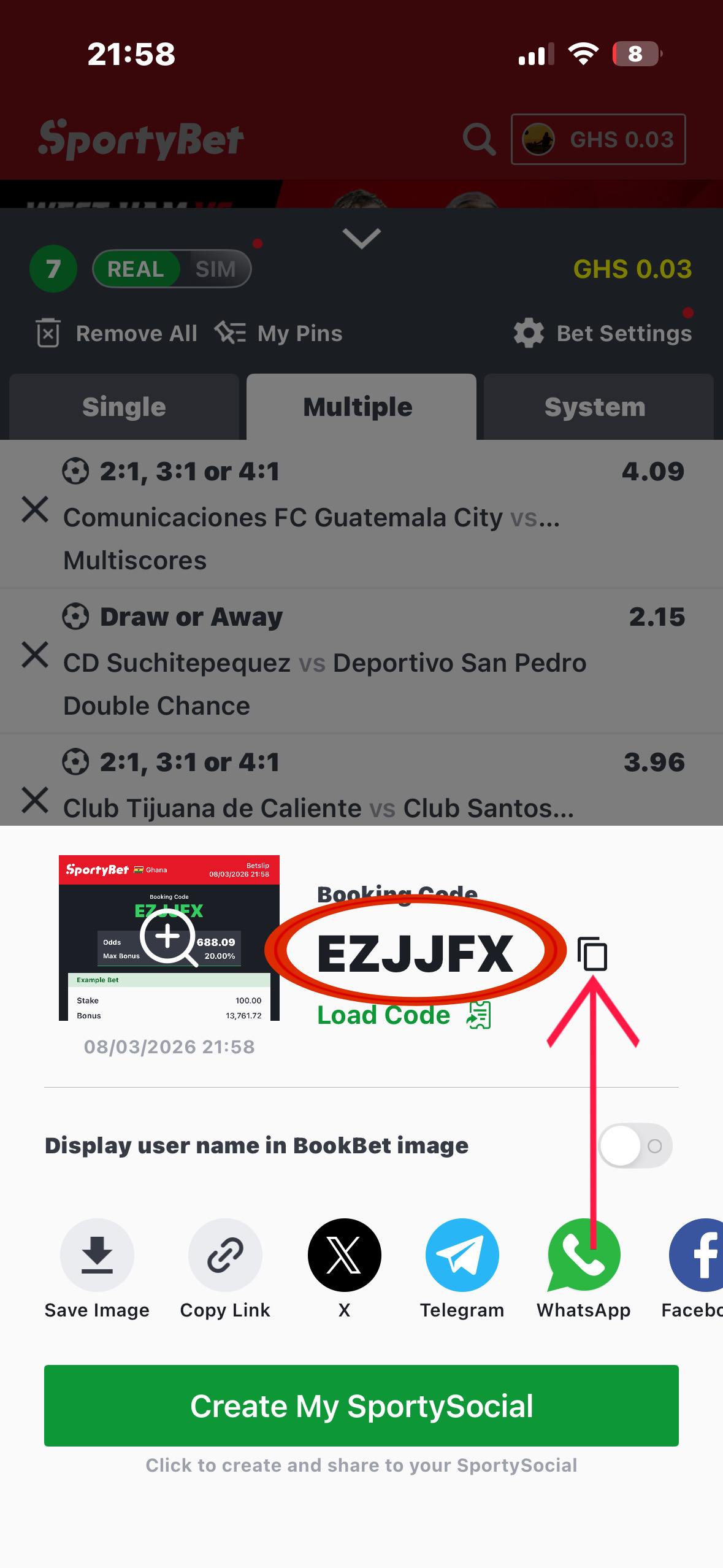
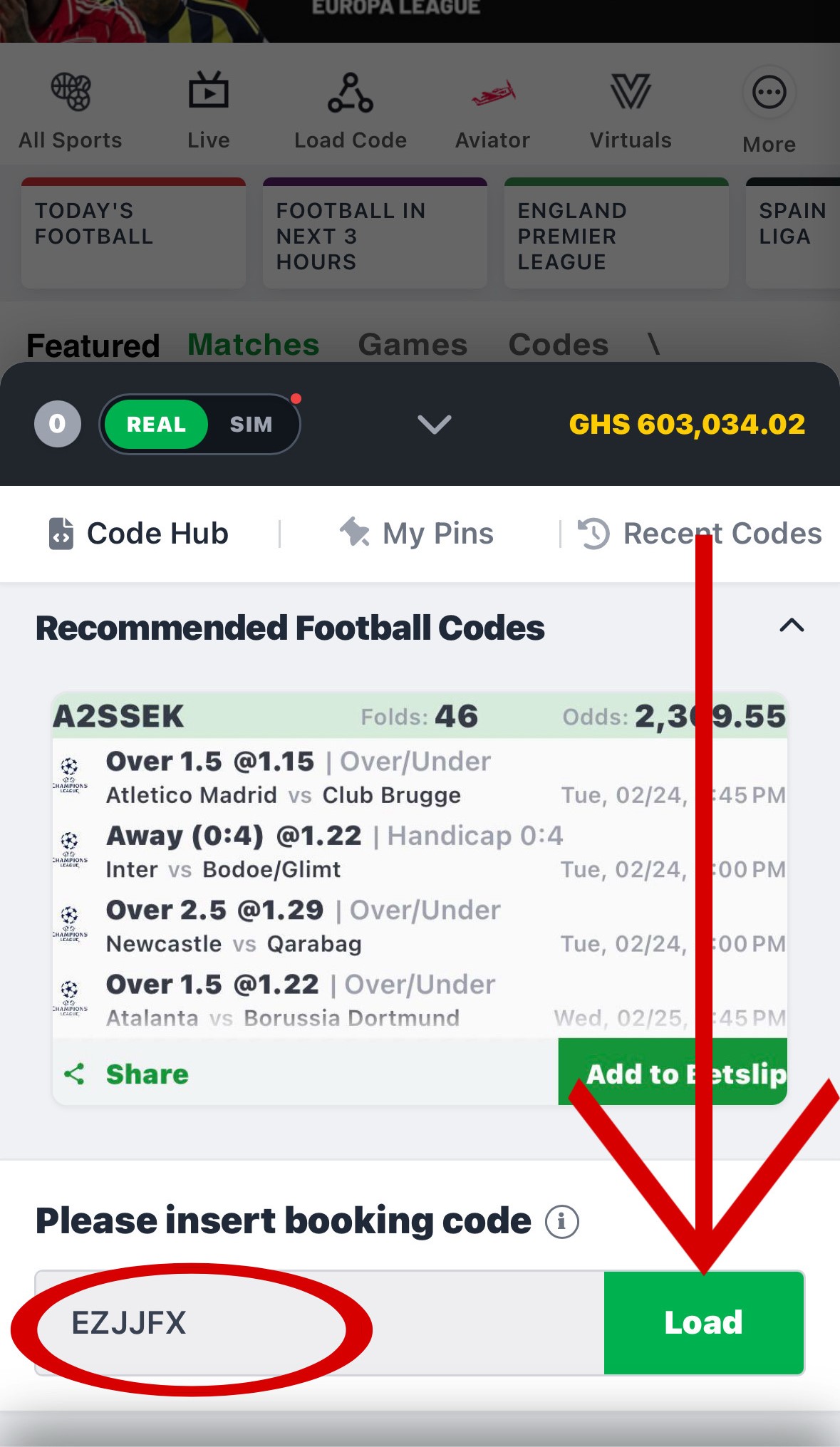
Go to SportyBet, build your bets, and copy the booking code from the betslip.
Pasting booking code in app betslip
2
Open our app's betslip, paste the code into the Booking Code field at the bottom, and tap Load — your matches appear automatically.
Pasting booking code in app betslip
3
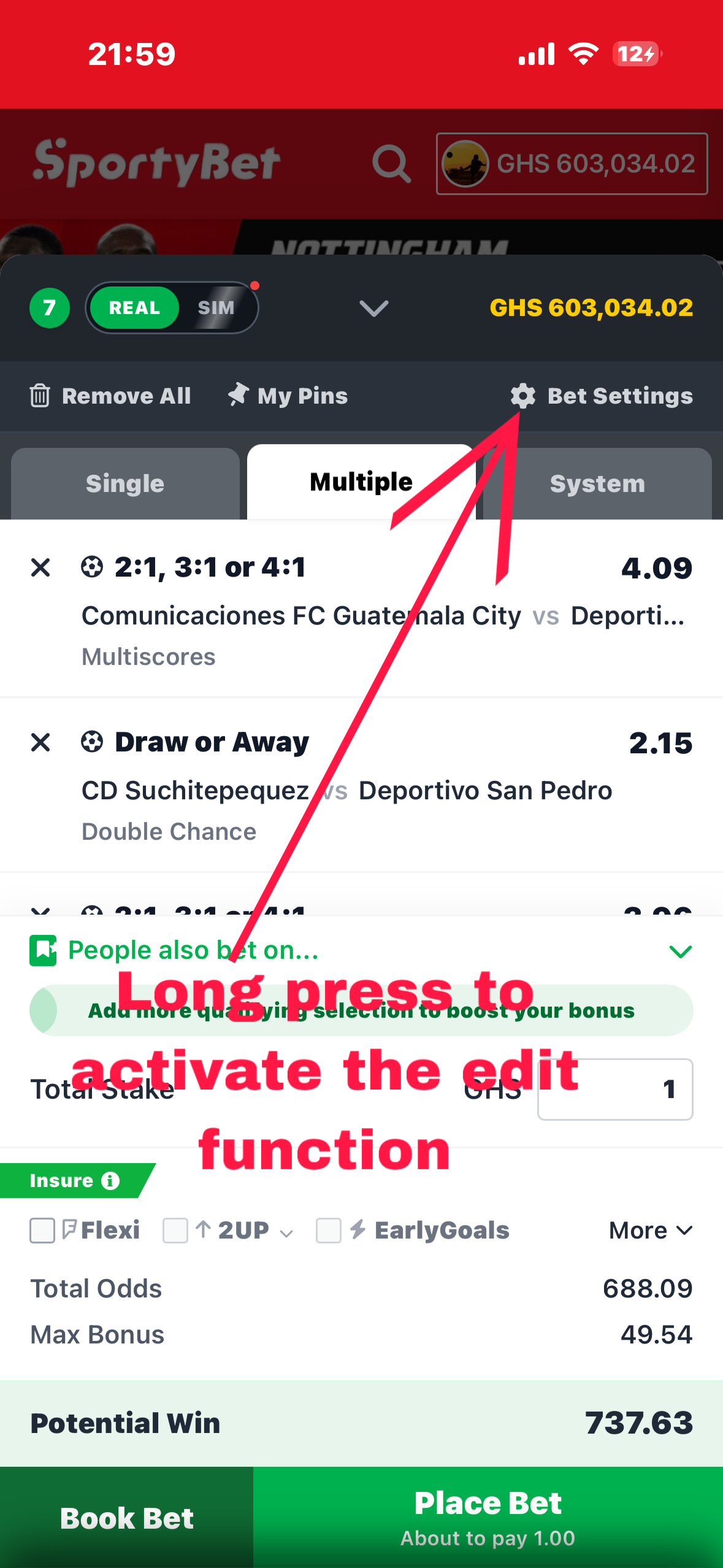
To edit any bet, odds, or amounts — long-press the Bet Settings ⚙ row for 1.5 seconds. Everything turns yellow and editable.
Pasting booking code in app betslip
4
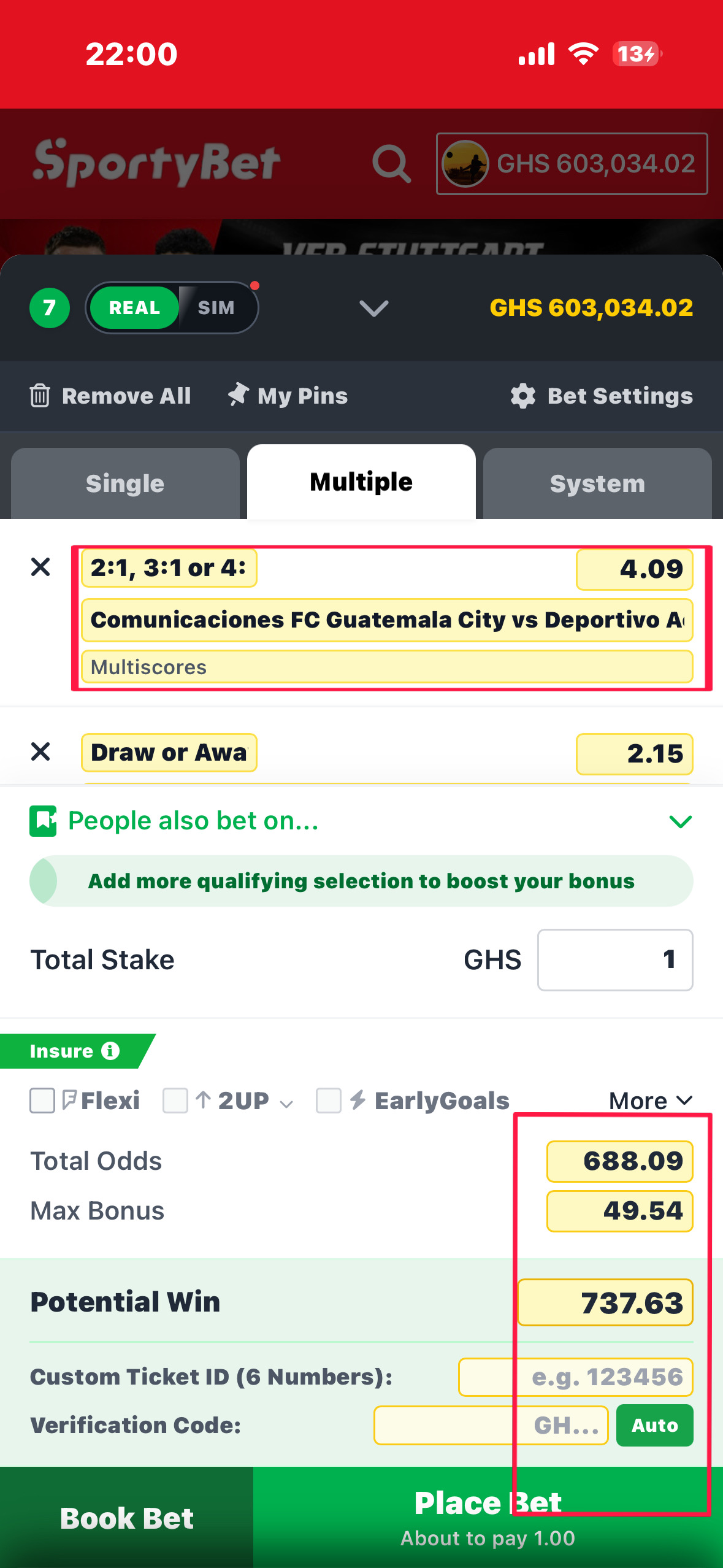
Change team names, odds, potential win, ticket ID — type whatever you want. Switch to SIM mode so the bet saves to history without deducting your balance.
Pasting booking code in app betslip
5
Tap the same Bet Settings ⚙ row again (short tap) to exit Edit Mode and go back to normal view.

How to Activate Edit Mode

Open the Betslip (tap the betslip icon in the bottom navigation). Make sure at least one selection is added so the footer is visible. Then long-press the Bet Settings row (the cog icon + words "Bet Settings") in the top-right area of the betslip toolbar for 1.5 seconds. The UI transforms — yellow-highlighted input boxes replace all normal display values.

⚠️ The long-press target is the Bet Settings row (cog icon) — NOT the betslip header or the stake field. Holding the stake field just opens your keyboard.
🔒 LONG PRESS 1.5s → Bet Settings row → Edit Mode ON
📷
Edit Mode activated — yellow input boxes visible
Replace this placeholder with your image

Second Way to Activate Edit Mode

On the Dashboard homepage, tap the Load Code button (clipboard icon) in the quick-links row. This silently sets Edit Mode on and opens the betslip already in edit state — no long press needed at all.

📷
Dashboard quick-links row — Load Code button
Replace this placeholder with your image

Raw Text Injector — Paste Entire Match Data

When Edit Mode is active, a yellow panel labelled "PASTE RAW BET DATA" appears at the top. Paste raw match data and the app parses it automatically — no need to fill team names, odds, and markets one by one.

📋 Expected format: Each match starts with Game ID:
Example: Game ID: 39403 | 22/02 19:45 Strasbourg v Lyon Pick Over 0.5 @1.31 Market Lyon Over/Under
📷
Raw Text Injector panel in betslip Edit Mode
Replace this placeholder with your image

Per-Bet Editable Fields

FieldWhat it does
Teams fieldChange the home and away team names shown
Outcome / PickChange what selection is shown (Home, Draw, Away, or any custom text)
OddsOverride the odds number shown on the card
MarketChange the market type label shown below the teams

Footer Override Fields

FieldWhat it does
Total OddsManually override the combined odds figure shown
Max BonusManually set the bonus amount displayed
Potential WinManually set the payout amount shown in the green bar
Custom Ticket IDSet a specific reference code for this ticket
Verification CodeSet manually, or tap Auto to generate a GH-prefixed code

SIM Mode — Zero Balance Deduction

At the top-left of the betslip header is a pill toggle showing REAL and SIM.

ModeWhat happens
REALDeducts the stake from the user's actual balance when the bet is placed
SIMPlaces the full bet and saves it to history with all ticket details — deducts nothing. Unlimited SIM bets build believable history with zero balance impact
The real SportyBet betslip cannot be edited at all. SIM mode, the raw text injector, per-field overrides, and the Load Code shortcut are exclusive to this clone.
📂
Open Bets
open_bets.php
1
Go to the Open Bets page. Your running bets appear as cards.
2
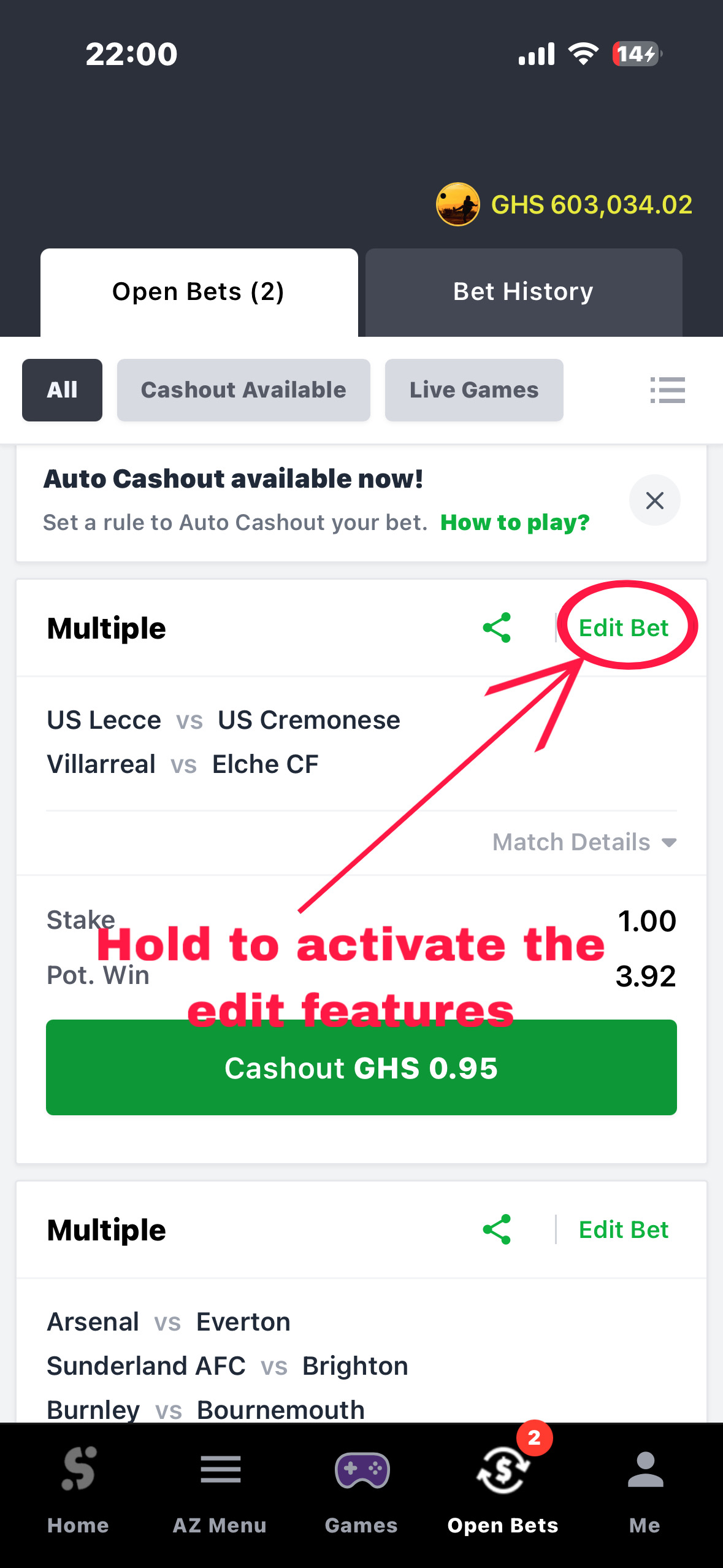
Long-press any bet card for 1.5 seconds — the phone vibrates and the card flips into an Admin Editor.
Pasting booking code in app betslip
3
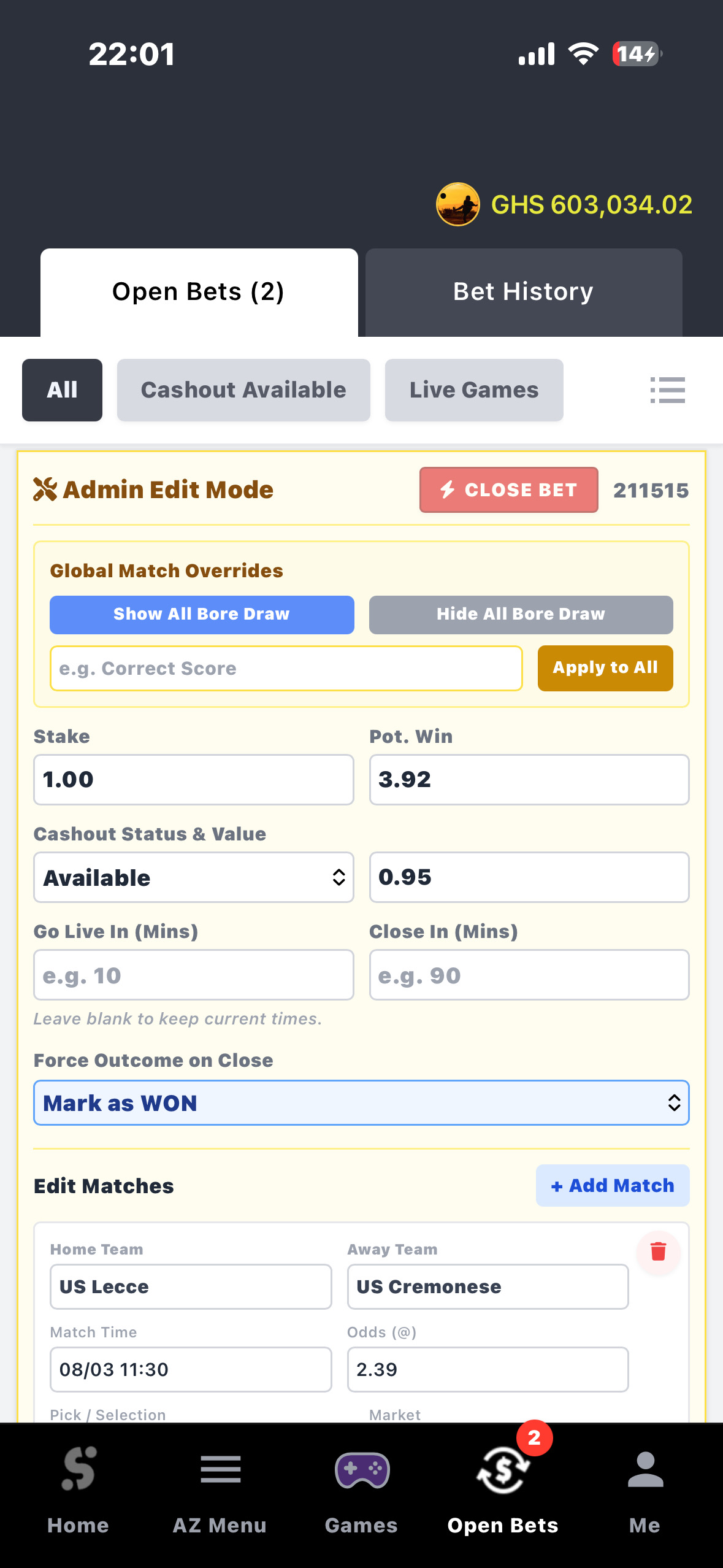
Set Force Outcome to Won or Lost. Set Close In (mins) to decide when the bet auto-settles. Or tap Close Bet to settle it right now.
4
Edit team names, scores, odds, cashout amount, stake — every field on every match inside the ticket.
Pasting booking code in app betslip
5
Tap Save Changes and the page updates instantly.

How to Activate Admin Edit Mode

On the Open Bets page, long-press anywhere on a bet card for 1.5 seconds. The phone vibrates briefly and the card flips from normal view into a yellow-tinted admin editor. Each ticket has its own independent edit mode — you can edit one while others stay normal.

🔒 LONG PRESS 1.5s → Any bet card → Admin Edit Mode
📷
Open Bets — card in Admin Edit Mode
Replace this placeholder with your image

Top of the Edit Card

ButtonWhat it does
Ticket Code (display)Shows ticket reference for confirmation — not editable
Close Bet (red, pulsing)Immediately force-settles the ticket RIGHT NOW using the Force Outcome setting

Global Match Overrides

ActionWhat it does
Show All Bore DrawAdds a "Bore Draw" badge to every match inside the ticket at once
Hide All Bore DrawRemoves the Bore Draw badge from every match at once
Market input + Apply to AllType a market name and set it on every match in one tap

Ticket-Level Fields

FieldWhat it does
StakeEdit the stake amount shown on the ticket
Pot. WinEdit the potential winnings figure shown
Cashout StatusSet to Available or Unavailable — controls if cashout button shows
Cashout AmountSet the exact cashout value the user sees (only when Available)
Go Live In (mins)Minutes from now before ticket shows as live/active
Close In (mins)Minutes from now before auto-settle triggers
Force Outcome on CloseChoose Won or Lost — applied when timer expires or Close Bet is tapped

Per-Match Editor

FieldWhat it does
Home / Away TeamChange the team names shown for this match
Match TimeChange the displayed kickoff date and time
OddsChange the odds shown for this match
Pick / SelectionChange what outcome is displayed as the user's bet
MarketChange the market type label
Bore Draw BadgeShow or hide the Bore Draw badge for this specific match
Trash icon (red)Remove this specific match from the ticket — permanent
+ Add MatchAdd a brand new blank match row to this ticket

Auto-Settle on Page Load

When Open Bets loads, the server immediately checks for any tickets whose settle time has already passed. Those are settled using their Force Outcome before the page even renders. If any settled as Won, their win amount is added to the user's balance and the Show Off popup fires after a 2-second delay.
💡 Set Close In = 5 mins, come back 5 minutes later and the settlement has already happened by the time the page loads.
The real SportyBet Open Bets page is completely read-only. Every control here — force outcome, cashout override, timers, match editing — is exclusive to this clone.
📜
Bet History
bet_history.php
1
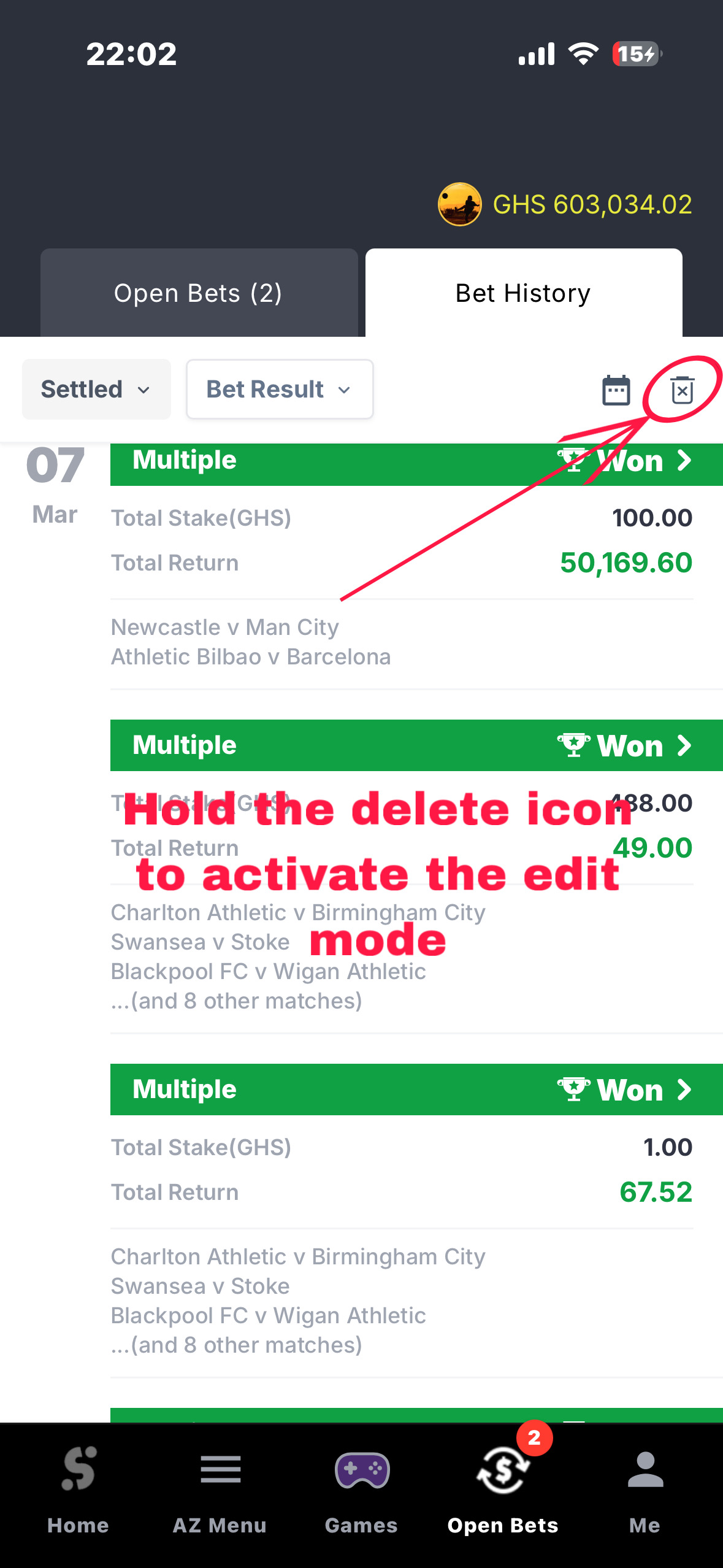
Go to Bet History. See the 🗑 trash icon in the top-right corner — it has two modes depending on how you press it.
2
Short tap the trash icon → Delete Mode (delete old bets by date group).
3
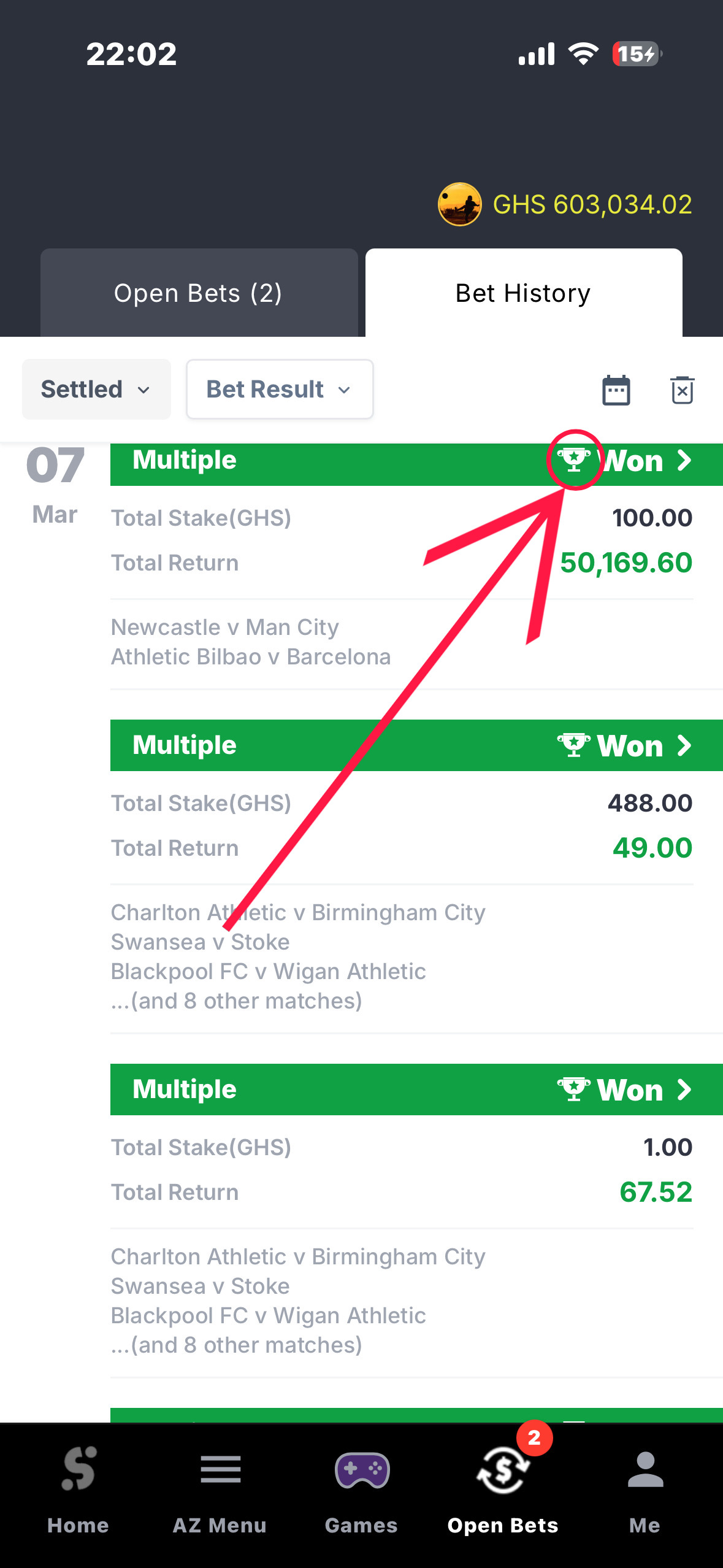
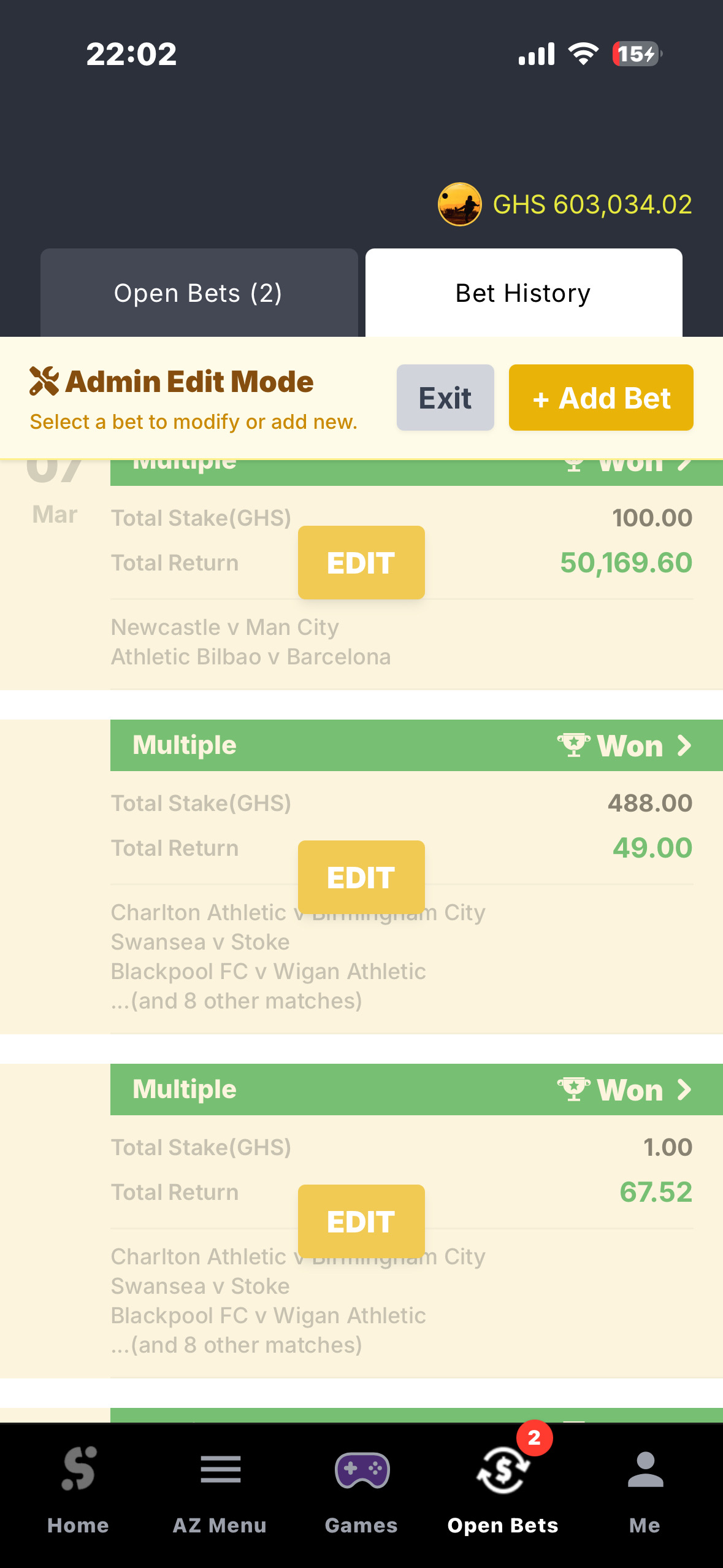
Long-press the trash icon for 1.5 seconds → Admin Edit Mode — a + Add Bet button appears and every card gets an Edit button.
Pasting booking code in app betslip
4
Tap + Add Bet to create a completely new bet from scratch. Load it via booking code or paste raw text — then set outcome, date, scores, and return.
Pasting booking code in app betslip
5
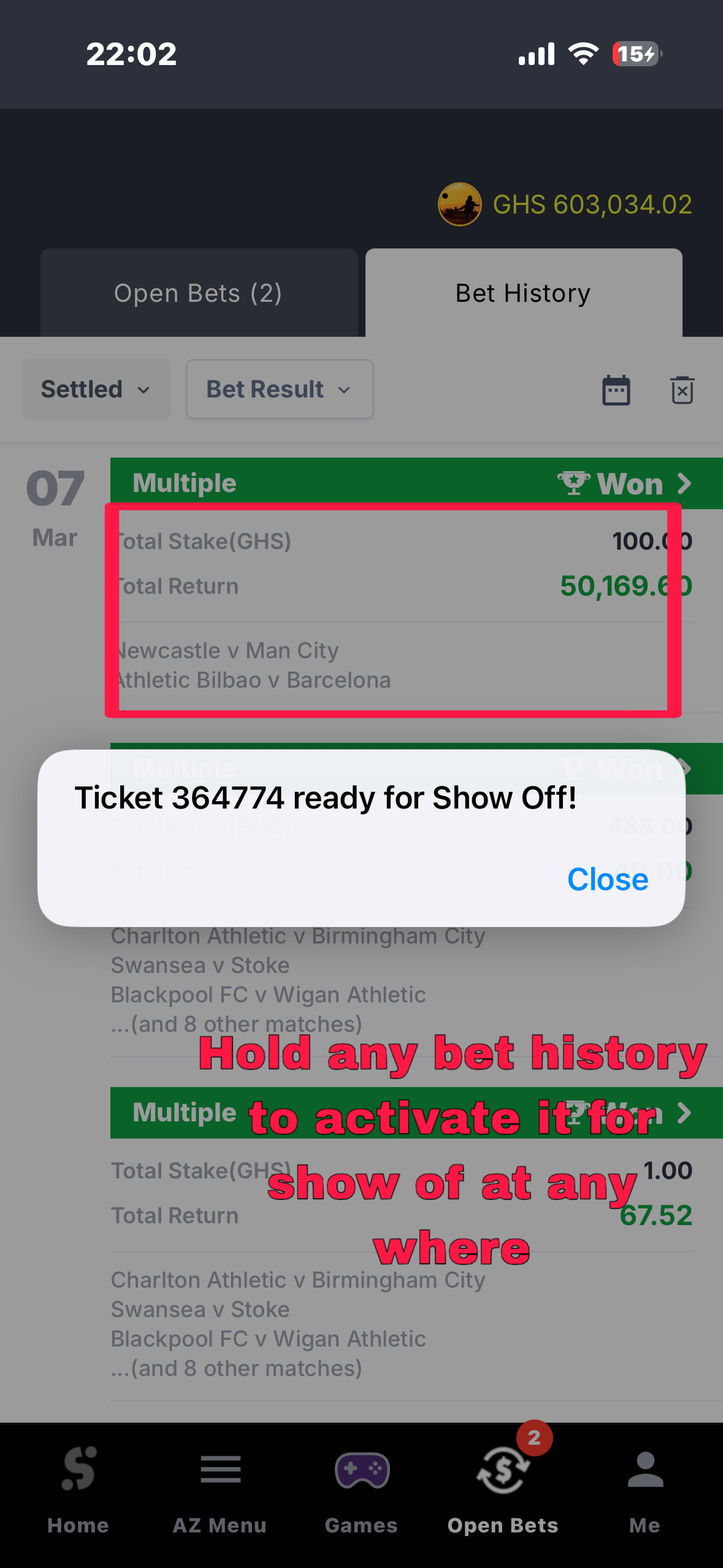
On any Won bet, tap the 🏆 trophy icon to switch it to a ⚡ lightning bolt — it looks like the result is still coming in live.
Pasting booking code in app betslip

Trash Icon — Two Hidden Modes

ActionWhat happens
Short tapActivates Delete Mode — checkboxes appear on each date group. Select and tap "Delete Selected" to permanently remove those tickets.
Long press (1.5s)Activates Admin Edit Mode — yellow toolbar slides up with "+ Add Bet" and Edit buttons appear on every card.
🔒 LONG PRESS 1.5s → Trash icon → Admin Edit Mode

Trophy / Lightning Bolt Toggle

Every Won bet row has a trophy icon on the right. Long-pressing for 1 second switches it to an animated yellow lightning bolt. Press again to switch back. This is visual only — it does not affect the stored result and resets on page refresh.

💡 Use case: Switch a Won bet to the lightning bolt to make it appear the match is still playing and the win is "coming in" — then confirm it by tapping back to the trophy in front of someone.
🔒 LONG PRESS 1s → Trophy icon → Show Off popup fires instantly

Show Off — Tapping a Card Sets the Popup Amount

When any bet card is tapped (even just to expand it), the app silently saves that ticket's details — ticket code, ID, and potential win amount — into localStorage under "showOffTicket". The next time the Games button long-press fires the Show Off popup, it uses this exact ticket's win amount.

📷
Master Bet Editor — creating a new ticket from scratch
Replace this placeholder with your image

Master Bet Editor — Step 1: Loading Matches

MethodHow it works
Booking Code + LoadEnter a booking code and tap Load. Fetches all matches and pre-fills everything automatically.
Raw Text + ParsePaste raw match data in the "Game ID:" format. All matches are extracted and added automatically.

Master Bet Editor — Step 2: The Form

FieldWhat it does
Bet DateSet the date and time this bet was "placed" — shown in the history list
Overall StatusSet the ticket outcome: Won, Lost, or Running
Verification CodeSet manually or leave blank to auto-generate. Only shown if status is Won.
All Won / All Lost buttonsMark every single match inside the ticket as Won or Lost in one tap
Per-match statusEach match has its own Won, Lost, or Running dropdown
Per-match scoreSet the final score for each match (e.g. "2 - 1")
Total StakeSet the stake amount for the whole ticket
Total ReturnSet the payout amount — type manually or auto-calculated
The real SportyBet bet history is completely read-only after settlement. The master editor, admin trash mode, and trophy/bolt toggle are all exclusive to this clone.
🎫
Ticket Details
ticket_details.php
1
Open any bet from Bet History or Open Bets to reach the Ticket Details page.
2
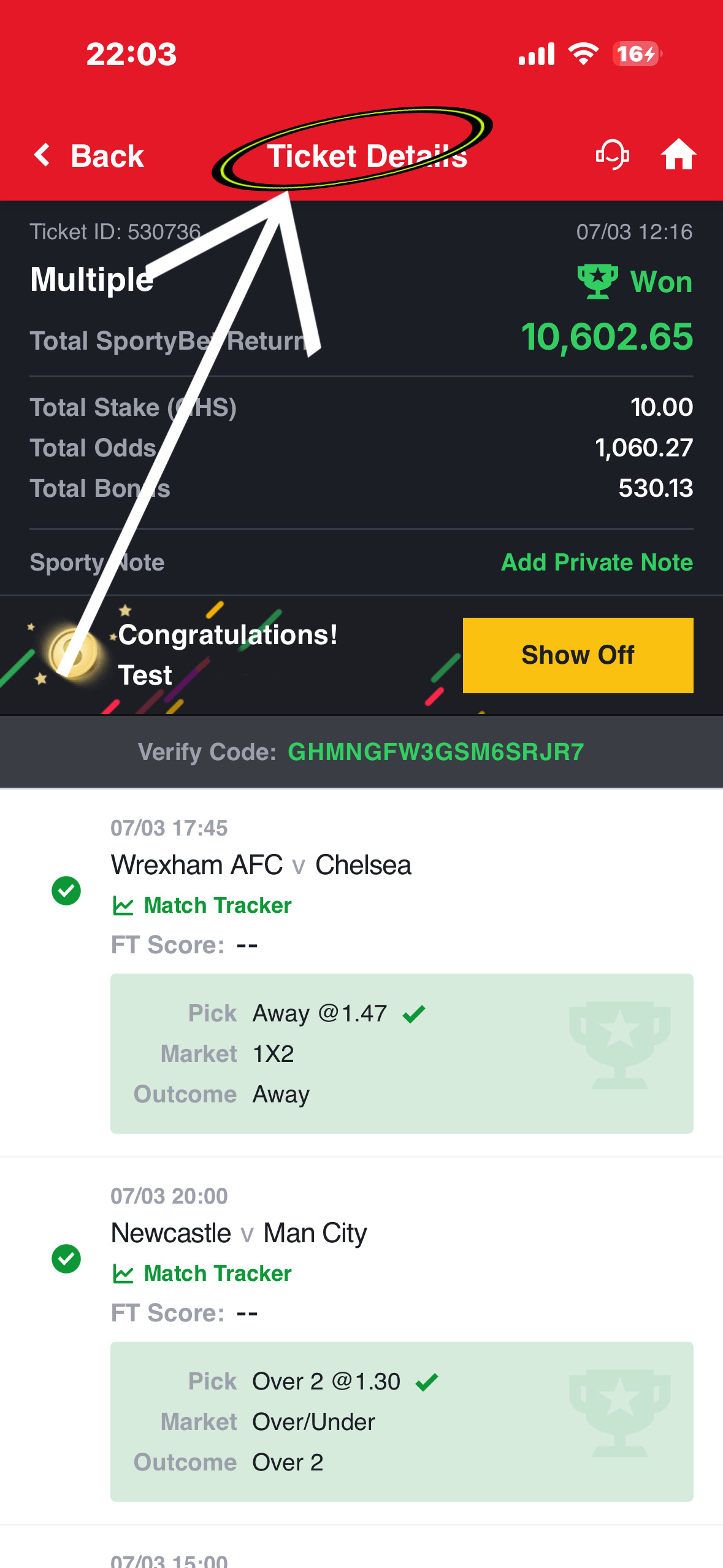
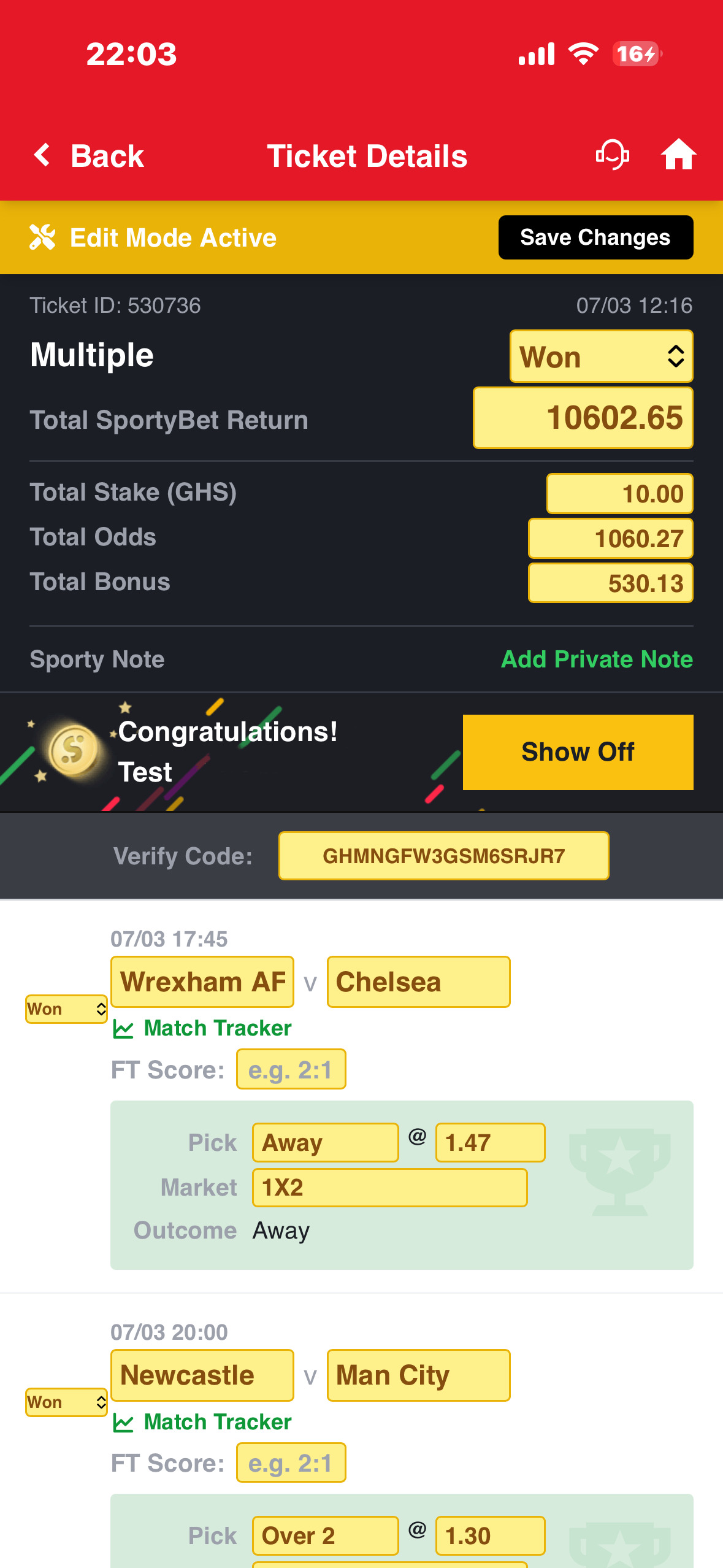
Long-press the text "Ticket Details" in the red header bar for 1.5 seconds — a yellow Edit Mode Active bar slides in.
Pasting booking code in app betslip
3
Every field becomes editable — status, total return, stake, odds, team names, FT scores, verification code — change anything.
4
On a Won ticket, tap the Show Off button to open the full celebration popup with the SportyBet logo visible — this is the only trigger that shows the logo.
Pasting booking code in app betslip
5
Scroll to the bottom and tap Delete Ticket to permanently remove this ticket from the database.

How to Activate Edit Mode

Open any ticket by tapping it in Bet History or Open Bets. On the Ticket Details page, the title "Ticket Details" sits in the centre of the red header bar. Long-press this title text for 1.5 seconds. A yellow "Edit Mode Active" bar slides in below the header. Every static display value is replaced by a yellow-bordered input box.

🔒 LONG PRESS 1.5s → "Ticket Details" header title → Edit Mode
📷
Ticket Details in Edit Mode — all fields editable
Replace this placeholder with your image

Top Section — Editable Fields

FieldWhat it does
Status dropdownChange overall ticket status: Won, Lost, or Running
Total ReturnChange the payout amount shown. For Won tickets, this is what the user sees as winnings.
Total StakeChange the stake amount displayed
Total OddsChange the combined odds. Once typed, auto-calculation is overridden.
Total BonusChange the bonus amount (only visible when status is Won)
Verification CodeChange the verification code — this is what the Verify Bet page checks

Auto-Recalculation

While in Edit Mode, if you change the stake or any individual match odds, the Total Return field updates automatically. You can override this by typing directly into Total Return at any time.

Per-Match Fields

FieldWhat it does
Home / Away TeamChange the team names shown for this match
FT ScoreSet the full-time score. Defaults to "--" if empty.
Pick / SelectionChange what outcome was selected as the bet
OddsChange the odds for this specific match
MarketChange the market type label
Match StatusWon (green tick), Lost (red cross), or Running (circle)

Show Off Button (Won Tickets Only)

On Won tickets, a "Show Off" button appears in the congratulations banner. Tapping it opens a bottom confirmation sheet. Confirming opens the full Show Off popup with the SportyBet logo visible — this is the only trigger that shows the logo.

The headphone icon next to the Home button in the header also opens the Show Off bottom sheet, pre-filled with this ticket's return amount and verification code.

📷
Won ticket — Show Off button and headphone icon
Replace this placeholder with your image

Delete Ticket

At the very bottom of the Ticket Details page there is a red "Delete Ticket" button. Tapping it shows a confirm prompt. Confirming permanently removes the ticket from the database and returns you to the previous page.

The real SportyBet Ticket Details page is completely read-only. The long-press Edit Mode, per-match editing, score field, and Delete Ticket button are all exclusive to this clone.
👤
Profile / Me Page
me.php
1
Go to your Profile (Me) page.
2
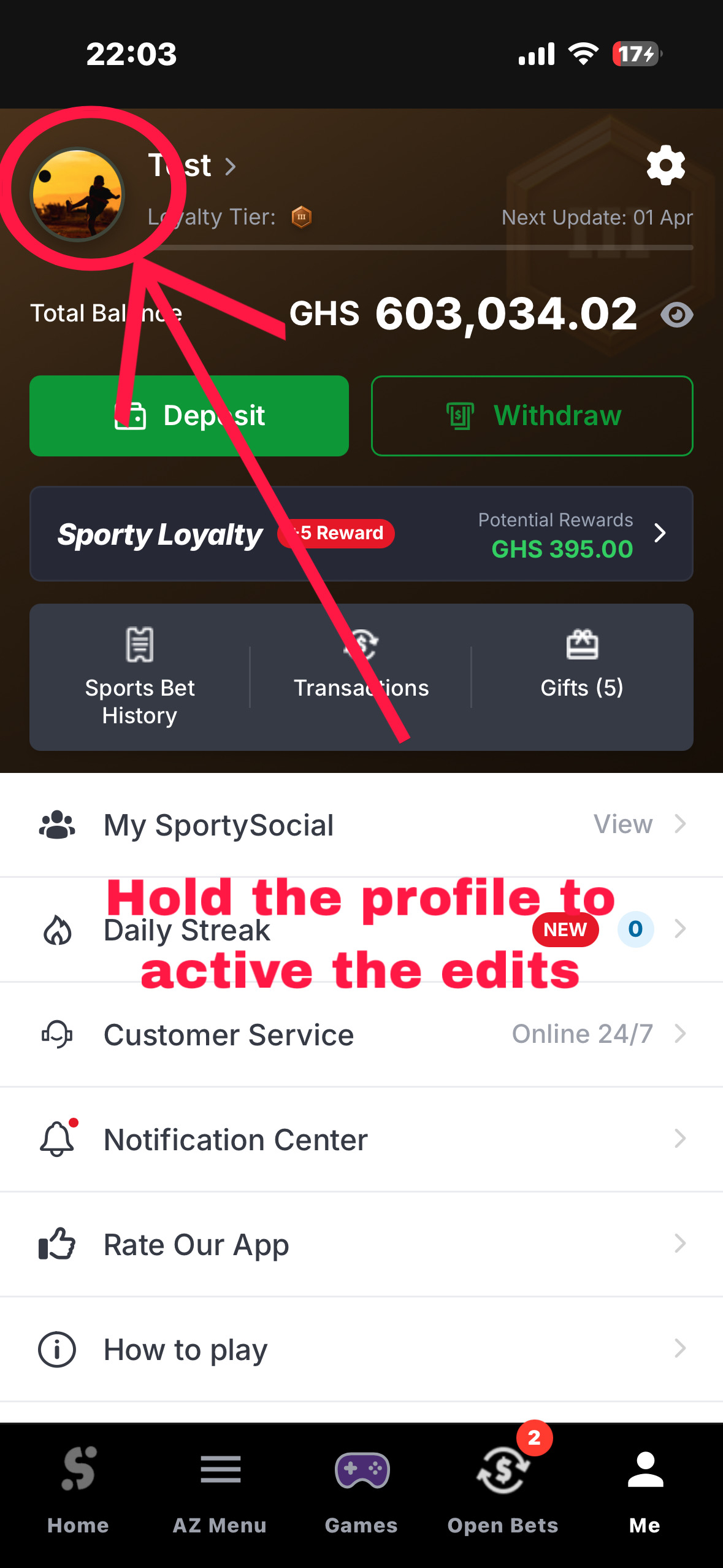
Long-press your avatar and username area at the top for 1.5 seconds — a Developer Settings modal slides up.
Pasting booking code in app betslip
3
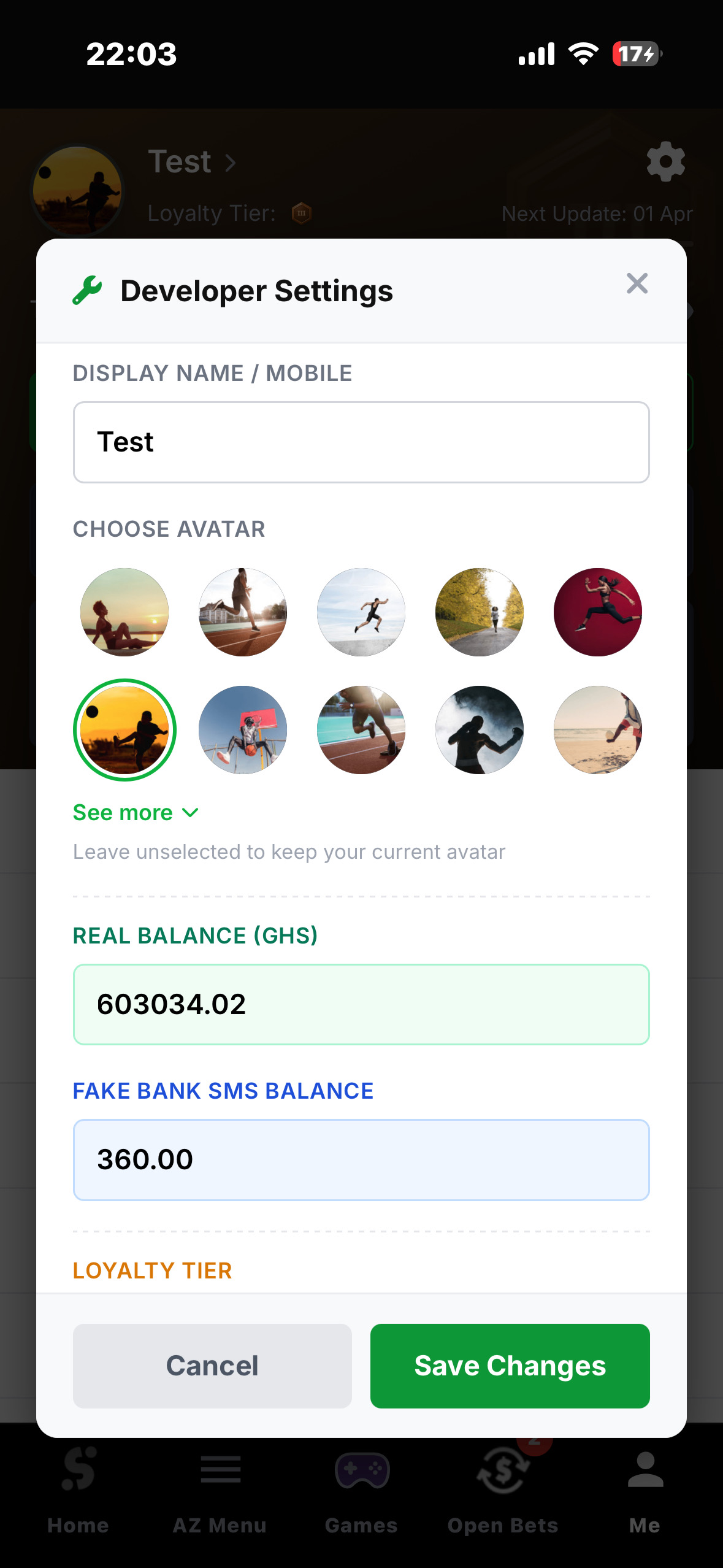
Set your Real Balance to any amount — this is the number shown in the header and deducted when bets are placed.
4
Set a Fake Bank SMS Balance — this number appears in the mobile money notification after withdrawals (not the SportyBet balance).
5
Pick any Loyalty Tier (Iron to Diamond) and choose any of the 24 real SportyBet avatars.
Pasting booking code in app betslip

How to Activate Developer Settings

On the Profile page, the top block contains your avatar circle, username, loyalty tier badge, and balance progress bar. Long-press this entire top block for 1.5 seconds. The phone vibrates and a modal labelled "Developer Settings" slides up from the bottom.

🔒 LONG PRESS 1.5s → Avatar + username top block → Developer Settings

All Developer Settings Fields

FieldWhat it does
Display Name / MobileChange the username or phone number shown on the profile and published bet codes
Choose Avatar5-column grid of all 24 real SportyBet CDN avatars. Tap any to select (green ring appears). Tap "See more" to expand remaining 14.
Real BalanceSet the user's actual in-app balance — shown in header, deducted when bets are placed, reduced on withdrawals
Fake Bank SMS BalanceA completely separate figure used only in the fake mobile money SMS notification after withdrawal. Does NOT affect real balance.
Loyalty TierOpens the 8-tier picker: Iron, Copper, Bronze, Silver, Gold, Platinum, Titanium, Diamond
Loyalty Reward UI AmountSet the "+X Reward" badge amount shown in the profile promo banner

Fake Bank SMS Balance — Explained

💡 Two completely separate balances that never mix:
Real Balance = SportyBet wallet. Shown in header, deducted on bets.
Fake Bank SMS Balance = Only appears in the fake MobileMoney SMS after a withdrawal. Never shown anywhere else in the app.

Each time a withdrawal is processed, the withdrawal amount is automatically added to the Fake Bank SMS Balance, so the "bank balance" grows realistically with each transaction.

Example: Set Fake Bank SMS Balance to GHS 5,000.00 — after a GHS 200 withdrawal, the SMS shows "Current Balance: GHS 5,200.00"

Loyalty Tier Selector

TierVisual
IronTier 0 — darkest, near-black gradient
CopperTier 1 — dark olive-green gradient
BronzeTier 2 — warm brown gradient (default on register)
SilverTier 3 — cool gray gradient
GoldTier 4 — amber/gold gradient
PlatinumTier 5 — blue-gray gradient
TitaniumTier 6 — deep purple gradient
DiamondTier 98 — dark blue gradient
📷
Loyalty Tier Selector — all 8 tiers shown
Replace this placeholder with your image
The real SportyBet does not let users set their own balance, choose loyalty tier, or control SMS notification content. The Developer Settings modal is exclusive to this clone.
💸
Withdraw Page
withdraw.php
1
Go to the Withdraw page. Enter an amount (minimum GHS 1.00), select your network (MTN, AirtelTigo, Telecel), and tap Withdraw.
2
A confirmation sheet slides up. Tap Confirm — a loading spinner runs for 3 seconds.
3
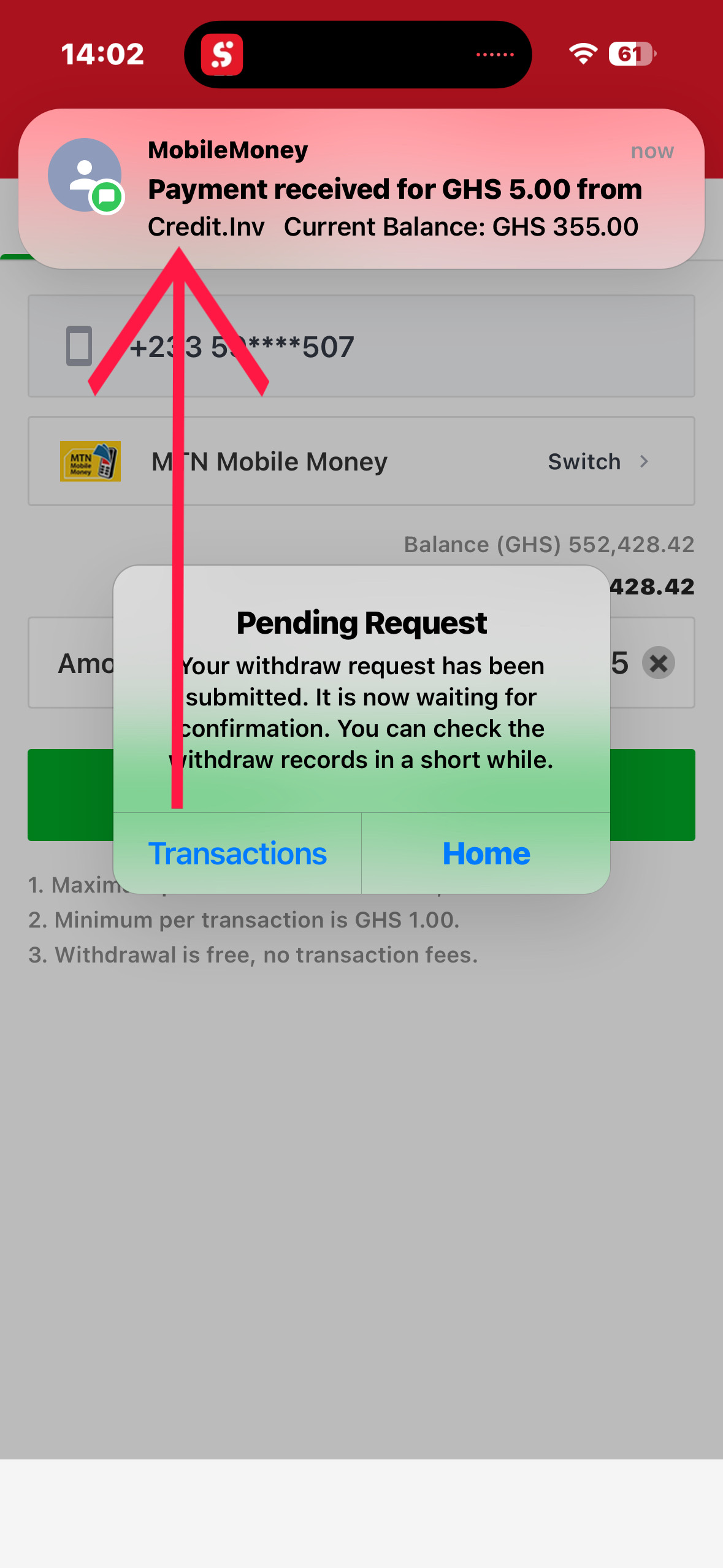
An iOS-style alert appears confirming the withdrawal request. 3 seconds later, a realistic MobileMoney SMS notification slides down from the top of the screen with the iPhone notification sound.
Pasting booking code in app betslip
4
The notification shows the Fake Bank SMS Balance (set in Developer Settings) — not the SportyBet wallet. It auto-dismisses after 5 seconds.

Full Withdrawal Flow — Step by Step

StepWhat happens
1. Enter amount + WithdrawConfirmation sheet slides up showing remaining balance, network, phone, and amount
2. ConfirmSheet closes and loading spinner appears for 3 seconds
3. Server processesWithdrawal amount is deducted from real balance. Same amount is added to fake_balance_seed. Transaction record inserted as "pending".
4. iOS-style alert fires"Your withdraw request has been submitted and is waiting for confirmation" — two buttons: Transactions and Home
5. SMS notification fires (3s later)Realistic iOS push notification slides down from the top styled exactly like a real MobileMoney SMS
6. Notification audio playsiPhone notification sound plays at the exact moment the notification slides in
7. Auto-dismissNotification stays for 5 seconds then slides back up and disappears
⚠️ The "Current Balance" in the SMS notification is the Fake Bank SMS Balance — not the SportyBet wallet balance. This intentionally simulates a bank account MobileMoney SMS.
📷
Full withdrawal flow — confirmation → spinner → notification
Replace this placeholder with your image
The real SportyBet does not generate a fake SMS, play sounds, or simulate bank credits. The entire iOS notification + audio system is exclusive to this clone.
🎮
Show Off — Games Button Secret
games.php + show_off_modals.php
1
First, choose your win amount: go to Open Bets and tap the card with the most impressive potential win (this secretly saves the amount).
Pasting booking code in app betslip
2
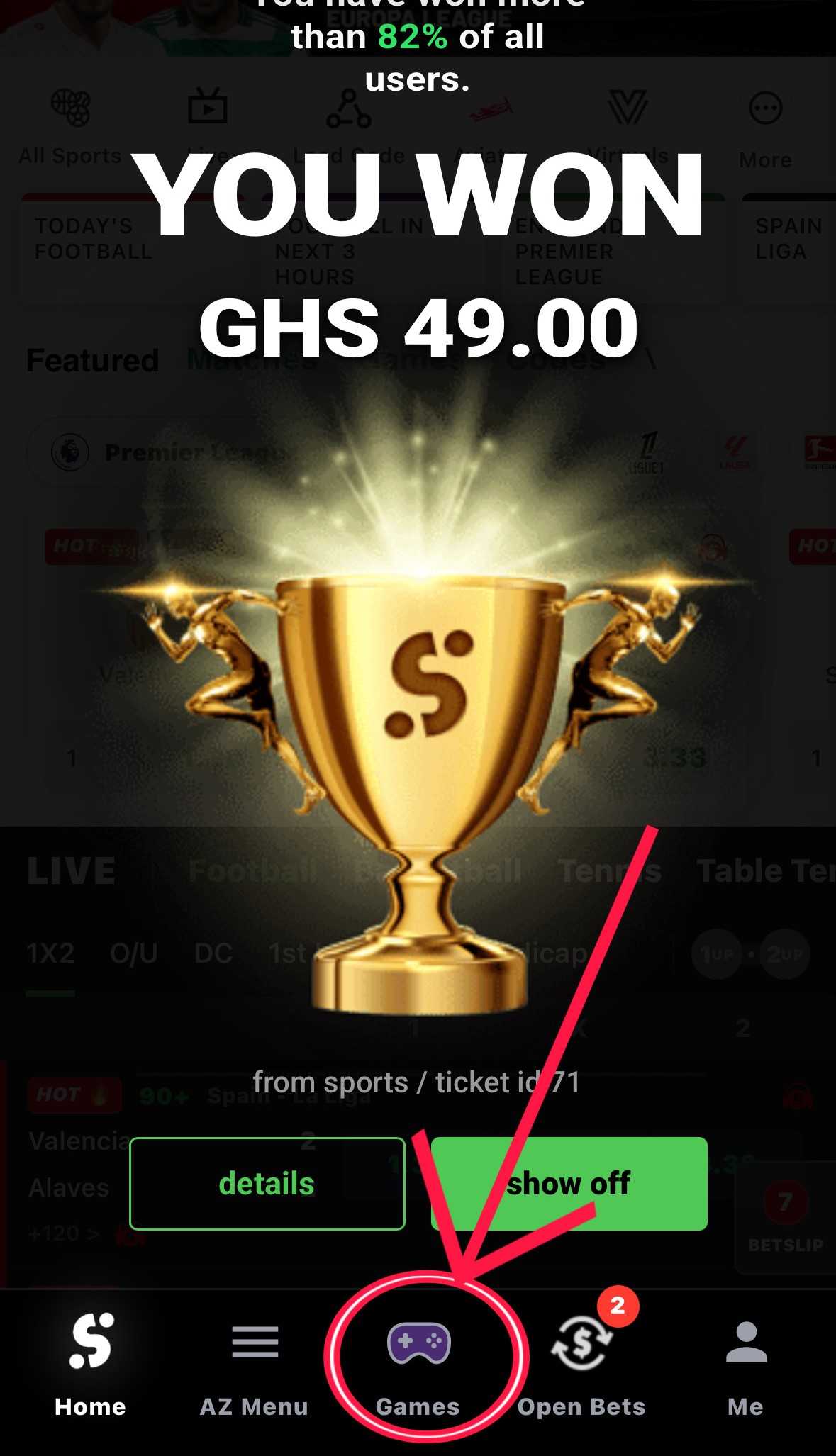
From any page in the app, hold the 🎮 Games button in the bottom navigation bar for 2 full seconds. The phone double-vibrates to confirm.
Pasting booking code in app betslip
3
The win amount is silently added to your real balance — no page reload. Then the full-screen 🎉 Show Off popup opens over everything.
4
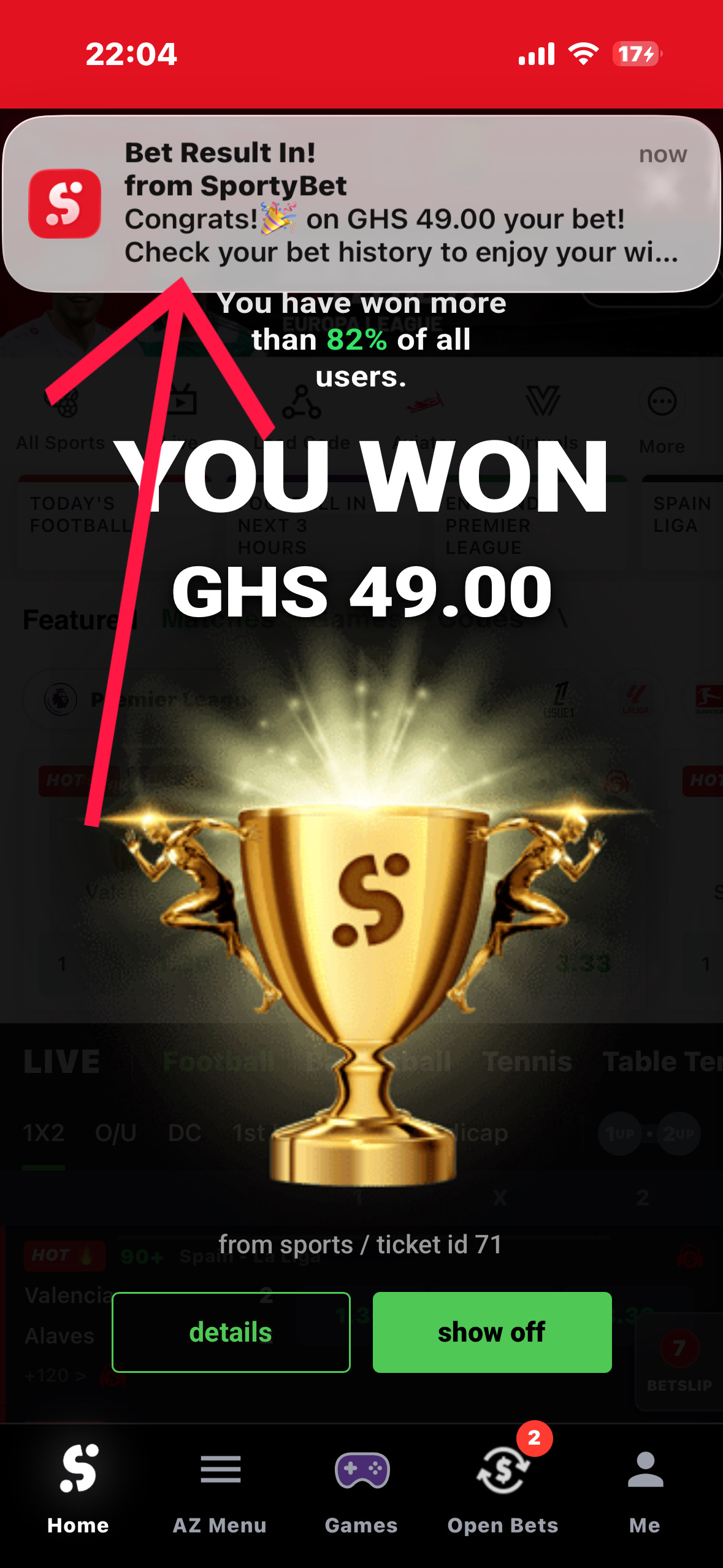
3 seconds later, the same iOS MobileMoney SMS notification slides down — showing the win amount. It stays 5 seconds then disappears.
Pasting booking code in app betslip
🔒 LONG PRESS 2s → Games nav button (any page) → Full Show Off Sequence

Full Sequence — What Happens

StepWhat happens
2-second hold detectedDouble-vibration pulse fires (100ms + 50ms + 100ms)
API call (background)api_secret_win.php is called silently, passing win amount from localStorage
Balance updatedWin amount is added to real balance in database. All visible balance elements update instantly.
Show Off popup opensFull-screen green celebration overlay appears immediately
3 seconds lateriOS-style fake SMS notification slides down from top with win amount
5 seconds laterNotification auto-dismisses

Controlling the Popup Amount

The win amount is not random — you control it. The amount shown is pulled from localStorage key "showOffTicket", which is set by:

Action that sets the amountWhere
Tap any bet cardOpen Bets page
Tap any bet cardBet History page
Place a bet from the betslipBetslip
💡 If nothing was ever tapped or placed, the default fallback amount is GHS 1,500.00.

All Show Off Triggers — Comparison

TriggerLogo visible?Confirmation step?Balance updated?
Show Off button (Ticket Details, Won)✅ YesBottom sheet firstNo
Long-press trophy icon (Bet History, 1s)❌ NoInstantNo
Games button long press (2s, any page)❌ NoInstant✅ Yes
Auto-settle timer expires❌ NoAutomatic✅ Yes
Force Close Bet as Won (Open Bets)❌ NoInstant✅ Yes

What's Inside the Show Off Popup

ElementDetail
Win amountLarge figure in the centre, e.g. GHS 1,500.00
Won % badgeRandom number between 78%–97% for realism
Ticket referenceThe booking/ticket code shown at the top
SportyBet logoOnly visible when triggered from Ticket Details Show Off button
See Details buttonGoes to Bet History
Share buttonOpens the ticket screenshot panel
The real SportyBet has no Show Off popup, no long-press trigger, no silent balance update, and no fake SMS from the nav bar. The entire Show Off system is exclusive to this clone.
🏠
Dashboard
dashboard.php
1
On the home screen, find the quick-links row (All Sports · Live · Load Code · Aviator · Virtuals · More).
2
Tap Load Code 📋 — this is a secret shortcut that opens the betslip already in Edit Mode without needing to long-press anything inside the betslip.
📷
Screenshot: Dashboard quick-links row showing Load Code button
Replace this placeholder with your image
3
Long-press the top promotional banner for 1.5 seconds to access the admin banner upload feature (admin accounts only — and all accounts are admin by default).

Load Code — Betslip Edit Mode Shortcut

Tapping Load Code calls activateSecretEditMode() which silently sets editMode = true inside the betslip engine, opens the betslip sheet, and re-renders the UI so all editable fields appear immediately. No long-press needed.

🔒 TAP → Load Code quick link → Betslip opens in Edit Mode instantly

Admin Banner Long Press

The wide promotional banner carousel at the top has a hidden admin trigger. It's only active if the banner element carries data-admin='true' — which is set when the account has role = 'admin'. Since all registered accounts are admin by default, this works for everyone.

🔒 LONG PRESS 1.5s → Promotional banner → Admin banner upload alert
💡 This banner trigger is currently a placeholder for a future banner management system. It shows a confirmation alert when triggered.
The real SportyBet has no "Load Code" link that secretly activates an edit mode, and no hidden banner admin trigger. Both are exclusive to this clone.
Connects to → Betslip (Edit Mode)
Quick Reference
📋
All Secret Triggers at a Glance
Every hidden action in one table
LocationTriggerWhat happens
Betslip — Bet Settings rowLong press 1.5sActivates Edit Mode — raw text injector + editable fields
Betslip — Bet Settings row (edit on)Short tapExits Edit Mode
Betslip — Verification Code → AutoTapGenerates a random GH-prefixed verification code
Dashboard — Load Code quick linkTapOpens betslip already in Edit Mode
Dashboard — Promotional bannerLong press 1.5s (admin)Admin banner upload alert stub
Open Bets — Any bet cardLong press 1.5sOpens Admin Edit Mode for that specific ticket
Open Bets — Close Bet (red)TapForce-settles the ticket immediately
Open Bets — Apply to AllType + tapSets market name on every match in the ticket
Open Bets — Match trash iconTapRemoves that match from the ticket (permanent)
Open Bets — + Add MatchTapAdds a blank new match row
Bet History — Trash iconShort tapDelete Mode — tick groups, then delete
Bet History — Trash iconLong press 1.5sAdmin Edit Mode — Add Bet + edit buttons per ticket
Bet History — Won icon (trophy)Long press 1sTriggers Show Off popup instantly
Bet History — Won icon (trophy)Short tapToggles icon between trophy and bolt (visual only)
Ticket Details — Header titleLong press 1.5sActivates Edit Mode — all values become input fields
Ticket Details — Show Off buttonTap (Won only)Bottom sheet → confirm → Show Off popup WITH logo
Ticket Details — Headphone iconTapOpens Show Off bottom sheet for this ticket
Ticket Details — Delete TicketTapConfirms then permanently deletes ticket from database
Profile (Me) — Avatar + username blockLong press 1.5sOpens Developer Settings modal
Profile — Loyalty Tier selectorTap inside modalOpens 8-tier picker: Iron through Diamond
Games nav button (any page)Long press 2sFull Show Off sequence: vibrate → balance update → popup → SMS
Admin Panel — Any table row → EditTapOpens edit modal for that database record (super admin only)